


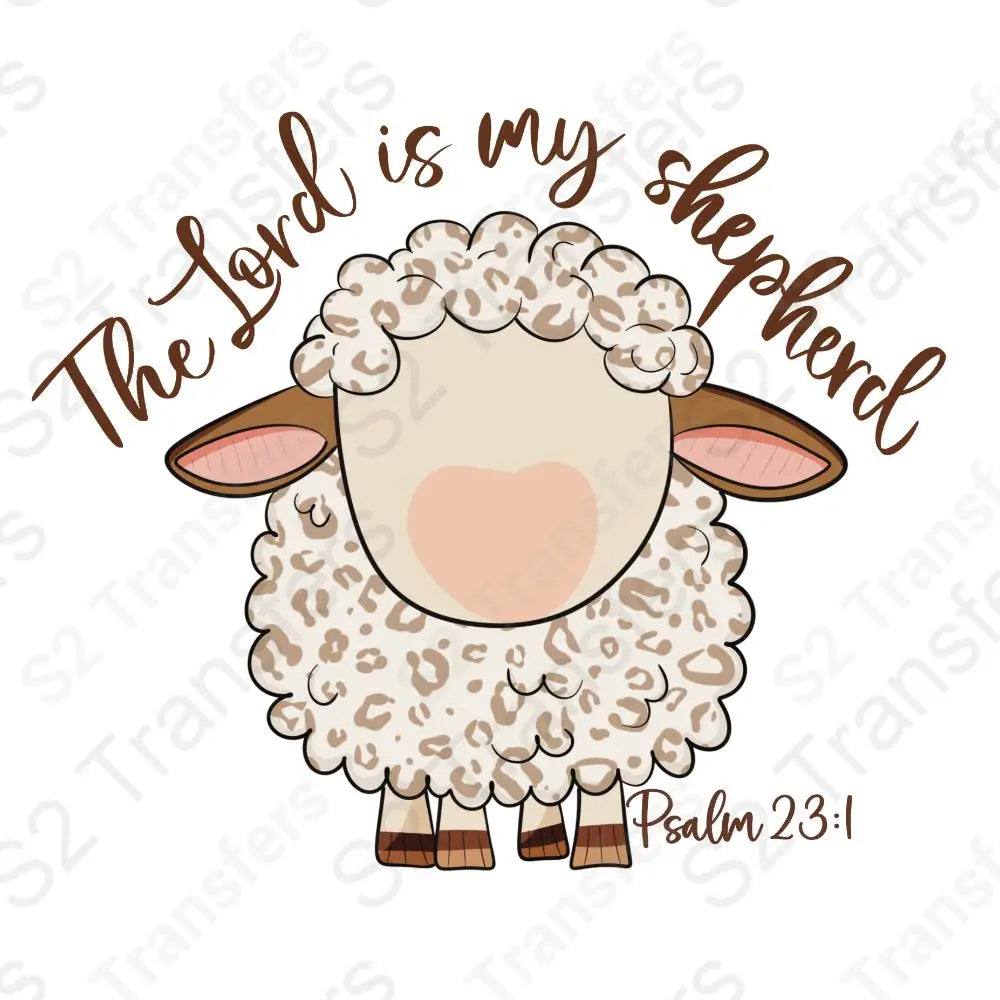
The Lord Is My Shepherd - DTF Transfer
Product Title:The Lord is My Shepherd Psalm 23:1 DTF TransferProduct Description:Enhance your fabric projects with the serene reminder of Psalm 23:1, "The Lord is my shepherd," beautifully depicted...
- Works with cotton, polyester & blends
- Vibrant colors
- Hot peel film
- No minimums
Total: 0 items · $0.00
Order in … for soon dispatch!
- Fast Delivery from Florida
- 100% Satisfaction Guaranteed
- Secure Checkout















About This Transfer
Product Details
Product Title:
The Lord is My Shepherd Psalm 23:1 DTF Transfer
Product Description:
Enhance your fabric projects with the serene reminder of Psalm 23:1, "The Lord is my shepherd," beautifully depicted on our DTF transfer. This charming sheep illustration is a subtle yet powerful way to display your faith. Ideal for customizing apparel, accessories, or creating unique gifts, this transfer infuses spirituality with style.
Key Features:
- Crisp and vibrant sheep graphic with the beloved Psalm 23:1 text.
- Easy-to-apply transfer suitable for various textiles.
- Resistant to washing, ensuring long-lasting wear.
- Perfect for personalization, crafting, and faith-based projects.
Craft with a purpose using our Psalm 23:1 DTF Transfer. It's more than just an embellishment; it's a daily inspiration and a testament to your faith. Make it a part of your creative journey today and carry the shepherd's message wherever you go.
Why Crafters Choose Our Ready-to-Press DTF Transfers
No Weeding Required
Skip the tedious cutting and weeding. Press straight from the film to the garment.
Unlimited Vibrant Colors
Full-color CMYK prints with crisp gradients, fine detail, and no color limits.
Easy Press & Peel
Press at 285–300°F for 8–12 seconds with medium pressure. Peel hot or cold, then post-press for 5 seconds. Follow our heat-press instructions for fabric adjustments.
Printed in Florida
Designed, printed, and shipped from our facility in sunny Florida. Made in the USA.
The S2 Transfers Process
How to Apply Your DTF Transfer
Heat press recommended for best results. Iron or Cricut press work too.

Position
Lay your garment flat. Position the transfer on the garment with the design side facing up.
Pre-press the garment for 5 seconds to remove moisture and wrinkles

Press
Press at 285–300°F for 8–12 seconds with medium, even pressure. Polyester needs lower settings; check our heat-press instructions before pressing.
Use a teflon sheet between the press and the film for the cleanest finish

Peel
Peel immediately, or let the transfer cool before peeling. Keep your hand close to the garment and peel across it. Cold peel works best for fine lines and details.
Use a cold peel for fine lines and detailed artwork

Press Again
Cover with Teflon for a shiny finish or parchment for a matte finish. Post-press at 285–300°F for 5 seconds with medium pressure; follow the fabric adjustments in our heat-press instructions.
Wash inside-out on cold, tumble dry low — lasts 75 washes
Questions about pressing? Reach out — we're happy to help.
Product Details & FAQ
Everything you need to know about this transfer — sizes, fabric compatibility, pressing instructions, and shipping. Have a question we didn't answer?
How do I order a ready-to-press design?
How do I choose a transfer size for my shirt?
Can I use my own artwork instead of a ready-to-press design?
Do DTF transfers include a shirt or digital download?
How do I apply a fabric DTF transfer?
How long do printing and shipping take?
What fabrics can I apply DTF transfers to?
How many washes do S2 DTF transfers last?
How should I wash clothing decorated with DTF transfers?
What Crafters Are Saying
Customer Reviews
Real reviews from real customers. Read what they have to say about our Ready-to-Press transfers.
Join Our Private Group
Be the first to learn about new RTP design drops, get exclusive group member discounts, helpful tips, tricks, step-by-step tutorials, and hang out with like-minded people like you.
Buddy's waiting inside!